NMSOL Resources
NMSOL Resources for New Mexico WIC Staff
New Mexico WIC staff operate the NMSOL system Successfully so they have more Opportunities to offer Legendary service to WIC families!
New Mexico WIC processes and records are maintained within a specialized computer system (NMSOL) that is often updated to ensure the best possible performance.
This page contains information specific to NMSOL that will help NM WIC staff perform their duties with the best understanding of the system they use

NM WIC Staff and Scheduling Resources
NMSOL RESOURCES for NM WIC Staff
NMSOL Scheduling Resources
What’s New in NMSOL?
There are two great ways to find the latest Enhancements, Release Notes, and Announcements!
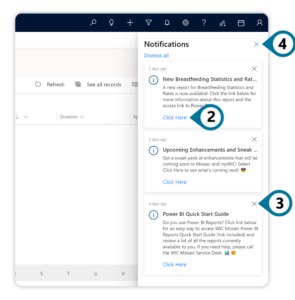
Notifications Pane
Steps:
- Select the Notifications Icon
on the Navigation Bar.

- Select Click Here in a Document Tile for the desired WIC Artifact. The document will open in a new tab.
- Optional: Select the X in the Document Tile to dismiss a single notification.
- Select the X in the top-right corner of the Notifications Pane to close it.
Help Area of the Site Map
Steps:
- Navigate to the Help area of the Site Map.
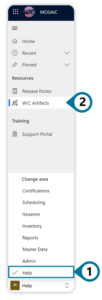
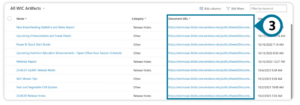
- Select WIC Artifacts under Resources in the Site Map.
- Select the Document Link for the desired WIC Artifact. The document will open in a new tab.